AI Implementation Consulting for Enterprise Teams
Your system says 47 units are in stock. What it doesn’t say is they’re 1,200 miles from the customer who just ordered. That’s single-location inventory logic, and it breaks the moment you add a second warehouse.
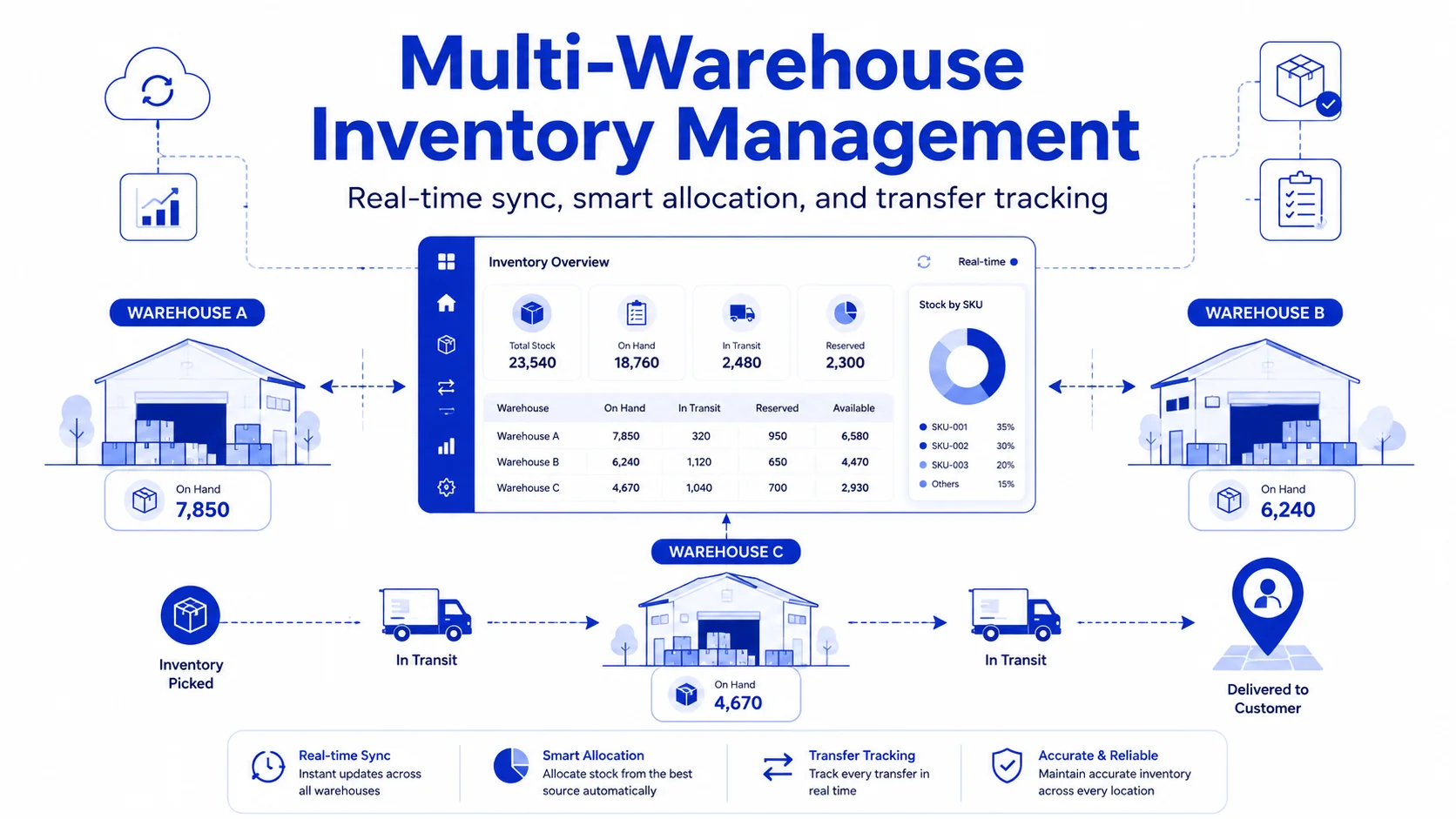
Multi-warehouse inventory isn’t the same system with more locations bolted on, it’s a different problem entirely: real-time sync, transfer tracking, and allocation logic that decides which warehouse ships what, in milliseconds. This guide covers how to actually build that system, not just buy one, and the architectural calls that decide whether it holds up during peak season or quietly falls apart.
Why Multi-Warehouse Inventory Breaks Traditional Systems
Most inventory tools are designed around a single source of truth: one warehouse, one stock count, one set of shelves. The moment you add a second location, that assumption collapses in three specific ways.
Stock visibility becomes probabilistic instead of certain
A single warehouse can confirm "47 units in stock." Multi-warehouse inventory management has to answer a harder question: where, and how fast can it reach the customer? Without real-time inventory synchronization, companies fall back on averaged counts or spreadsheets and the errors compound as order volume grows.
Inventory transfers create a reconciliation gap
Stock moving between warehouses passes through a gap: not available at origin, not yet receivable at the destination. Without explicit inventory transfer management, systems either double-count stock or lose it entirely mid-transfer.
Allocation logic needs a decision engine, not a lookup table
One warehouse means "ship from here." Multiple warehouses mean every order needs a real-time call, that is, proximity, stock, shipping cost, capacity made by a warehouse order allocation engine in milliseconds, not a person checking three spreadsheets.
Signs Your Business Has Outgrown Its Current Inventory System
Use this quick checklist:
- Stock accuracy depends on manual checks or spreadsheets.
- Teams cannot confirm real time stock availability quickly.
- Different warehouses show different counts for the same SKU.
- Stock transfers become hard to track once inventory leaves one location.
- Teams use calls, chats, or spreadsheets to decide which warehouse should fulfill an order.
- Overselling, stockouts, or phantom stock issues happen regularly.
- Inventory reports do not match the actual stock on the warehouse floor.
- Adding a new warehouse, sales channel, or fulfillment process feels risky.
- Order allocation is handled manually instead of through system logic.
- Warehouse teams bypass the system because the workflow is too slow or confusing.
If several of these are true, the problem is not just inventory management. It is the inventory system architecture.
Where Nyx Wolves Fits Into Multi Warehouse Inventory System Development
Before touching any code or vendor platform, the foundational architecture has to answer four questions correctly. Get these wrong and no amount of UI polish will fix the operational chaos downstream.
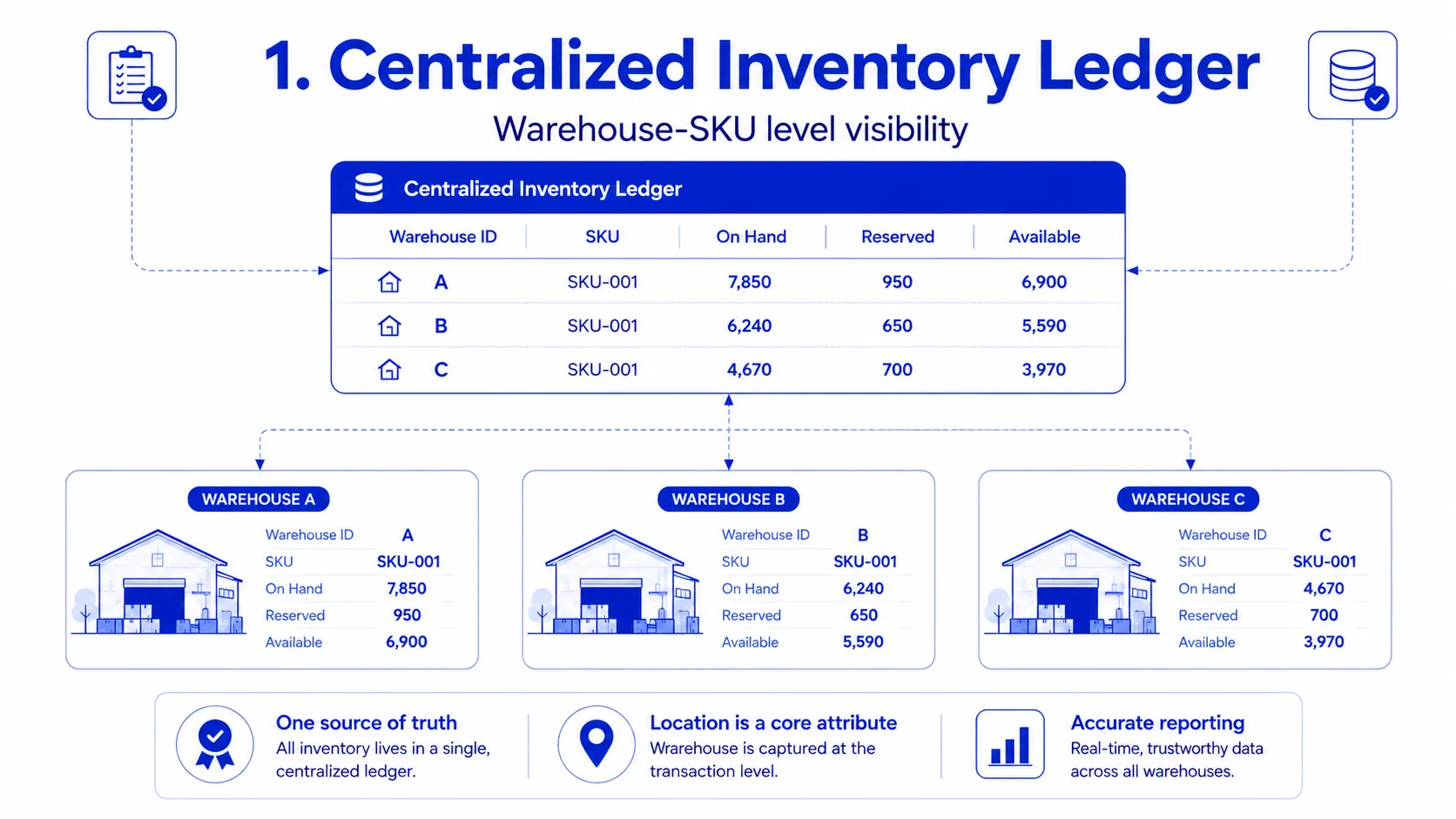
Inventory Ledger: Is location built into the schema, or bolted on?
One source of truth, structured at the warehouse-SKU level, not just SKU level. Every record carries a warehouse identifier as a first-class attribute. Most stock discrepancies, sync failures, and reporting errors trace back to a location field added after the fact to single-warehouse software.
Nyx Wolves approaches inventory system architecture by designing multi location support from the foundation. Warehouse, SKU, batch, transfer, reservation, and availability logic are treated as core data model decisions, not later customizations.
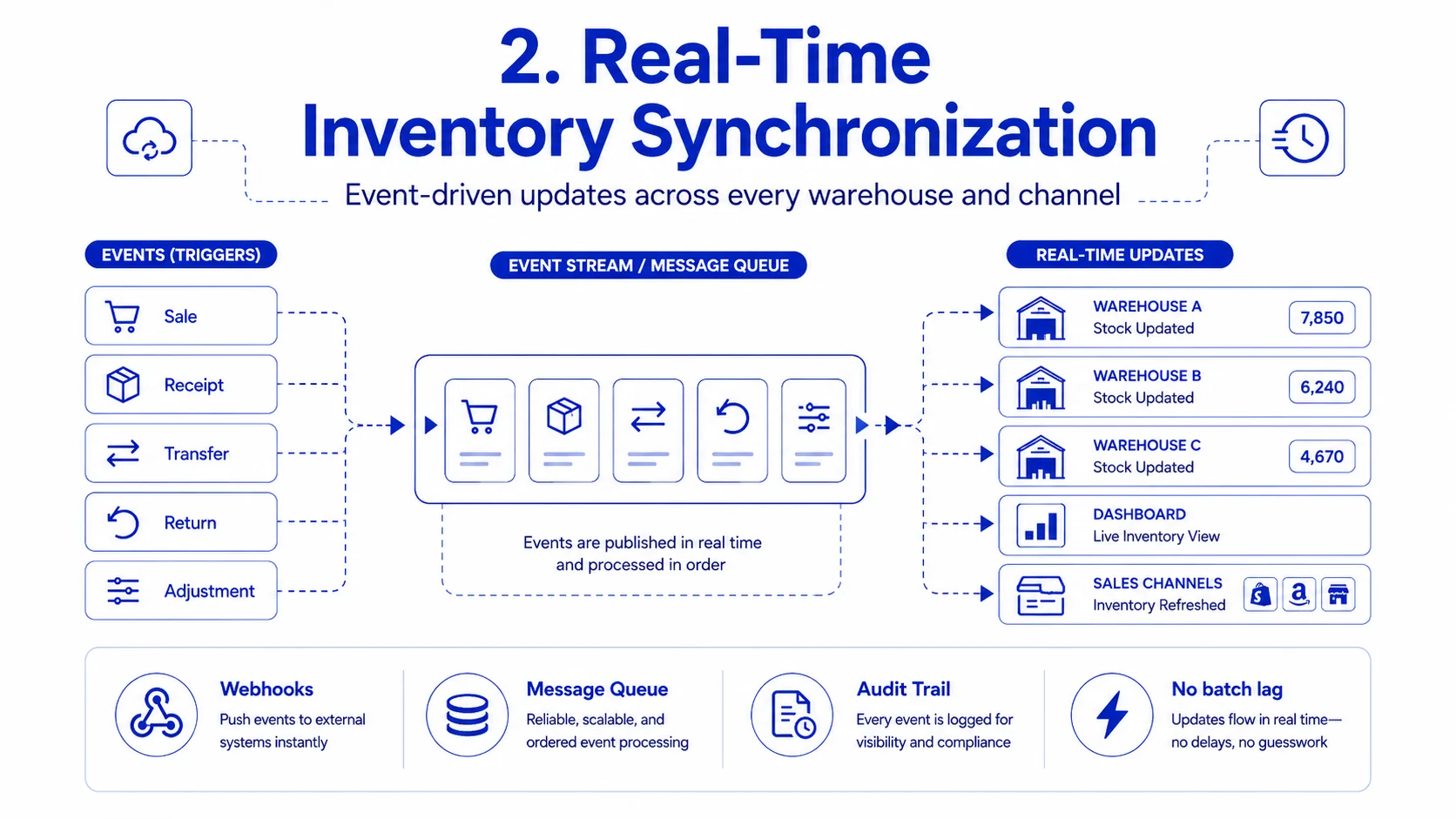
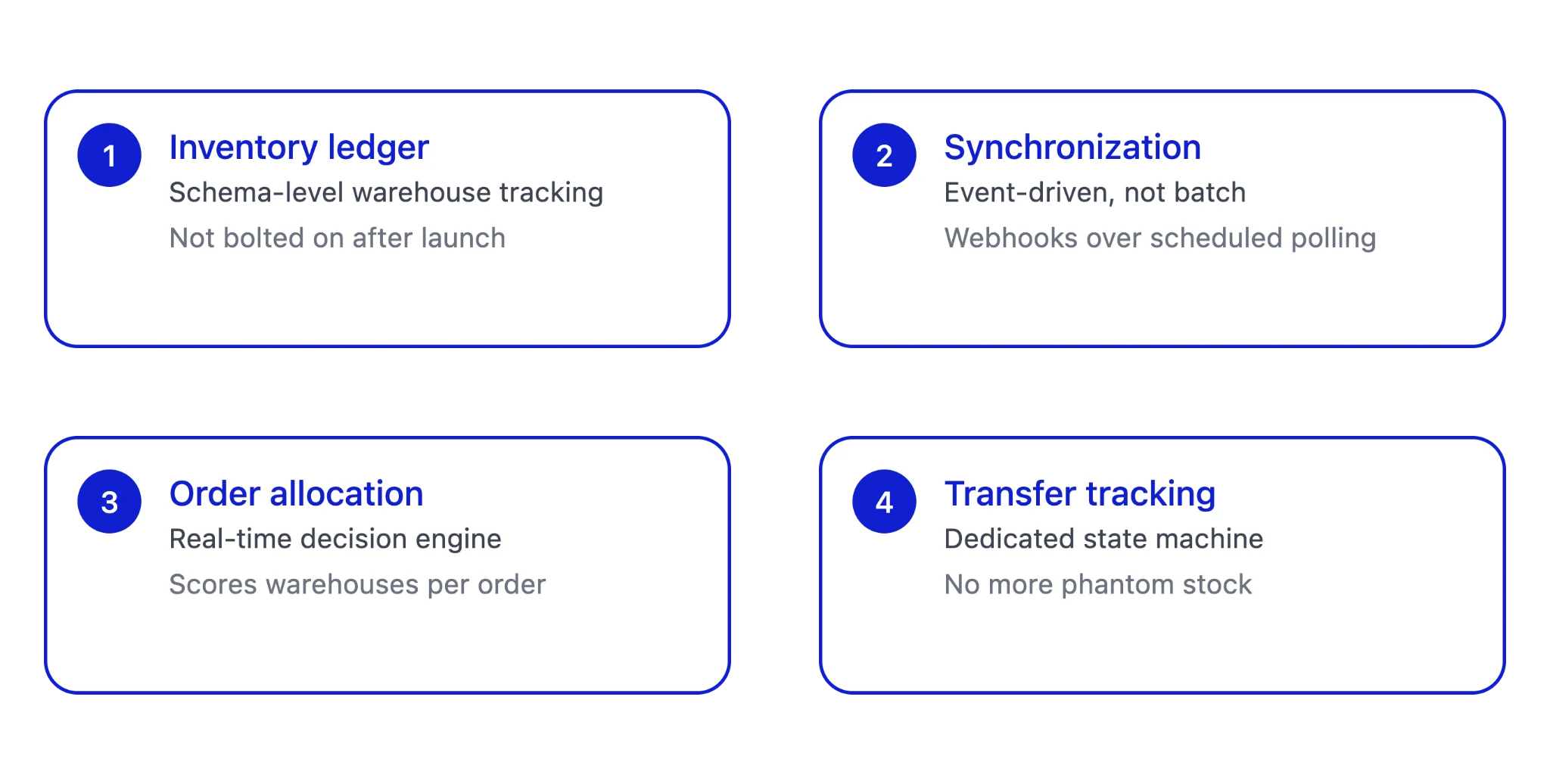
Synchronization: Real-time, or nightly batch?
Batch syncs fail the moment stock can be reserved at one warehouse while still showing available at another. The fix is event-driven sync, using webhooks or message queues instead of polling, paired with an event-sourced ledger where every sale, receipt, transfer, and return is logged as a discrete event, and current stock is derived from that stream rather than stored as one mutable number.
Nyx Wolves uses this kind of event driven thinking when designing inventory management systems for businesses that need traceability and operational reliability at scale.
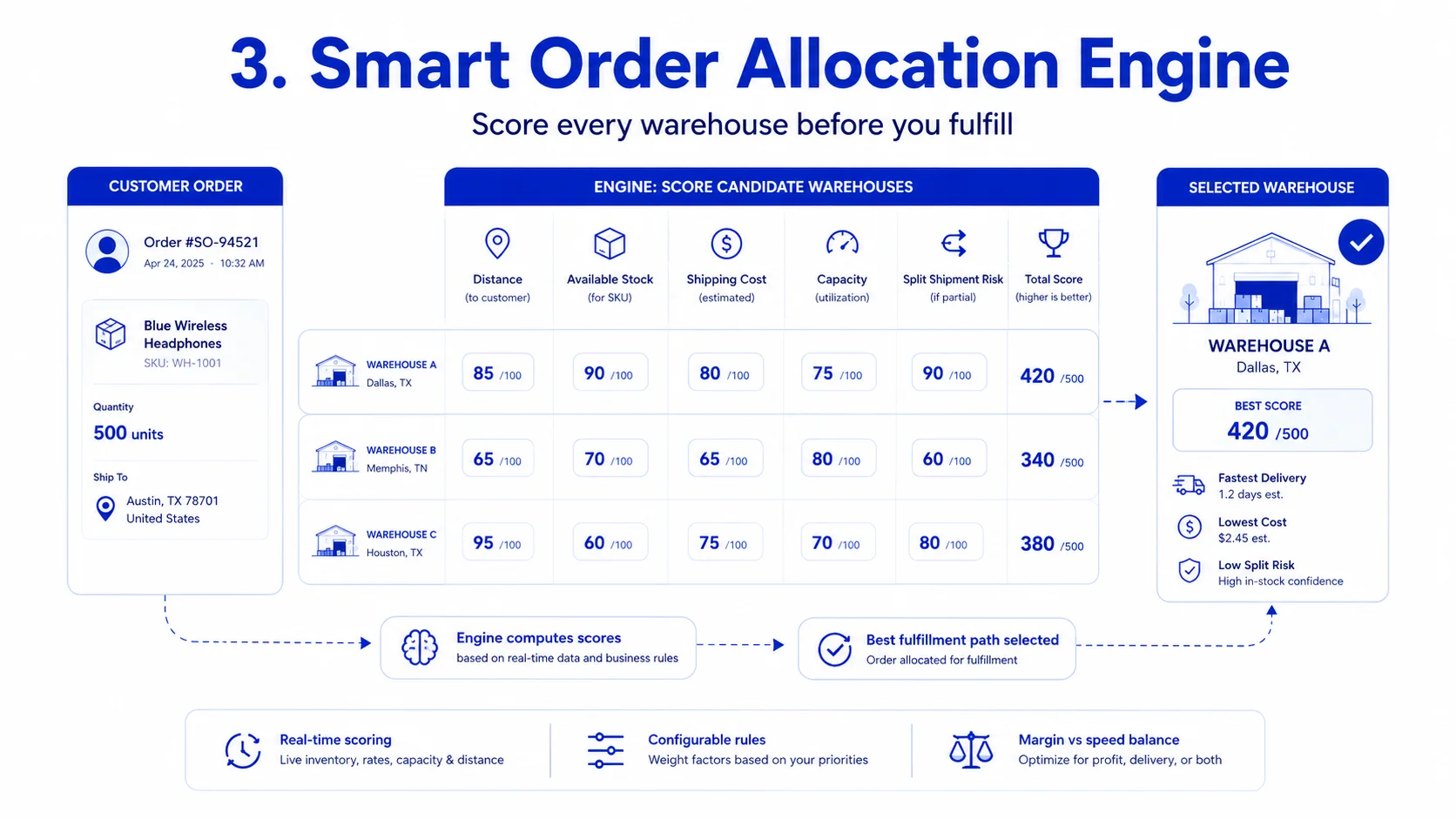
Order Allocation: A fixed rule, or a decision engine?
Shipping from the nearest warehouse looks efficient until that warehouse runs low and you’re stuck with delays or expensive split shipments. A real allocation engine scores every warehouse against every order in real time, weighing distance, available stock, capacity, and split-shipment cost, and stays configurable since the right answer differs for a margin-first operation versus a speed-first one.
At Nyx Wolves, we do not treat allocation as a hard coded rule. We design it as a decision engine that can evolve with business priorities.
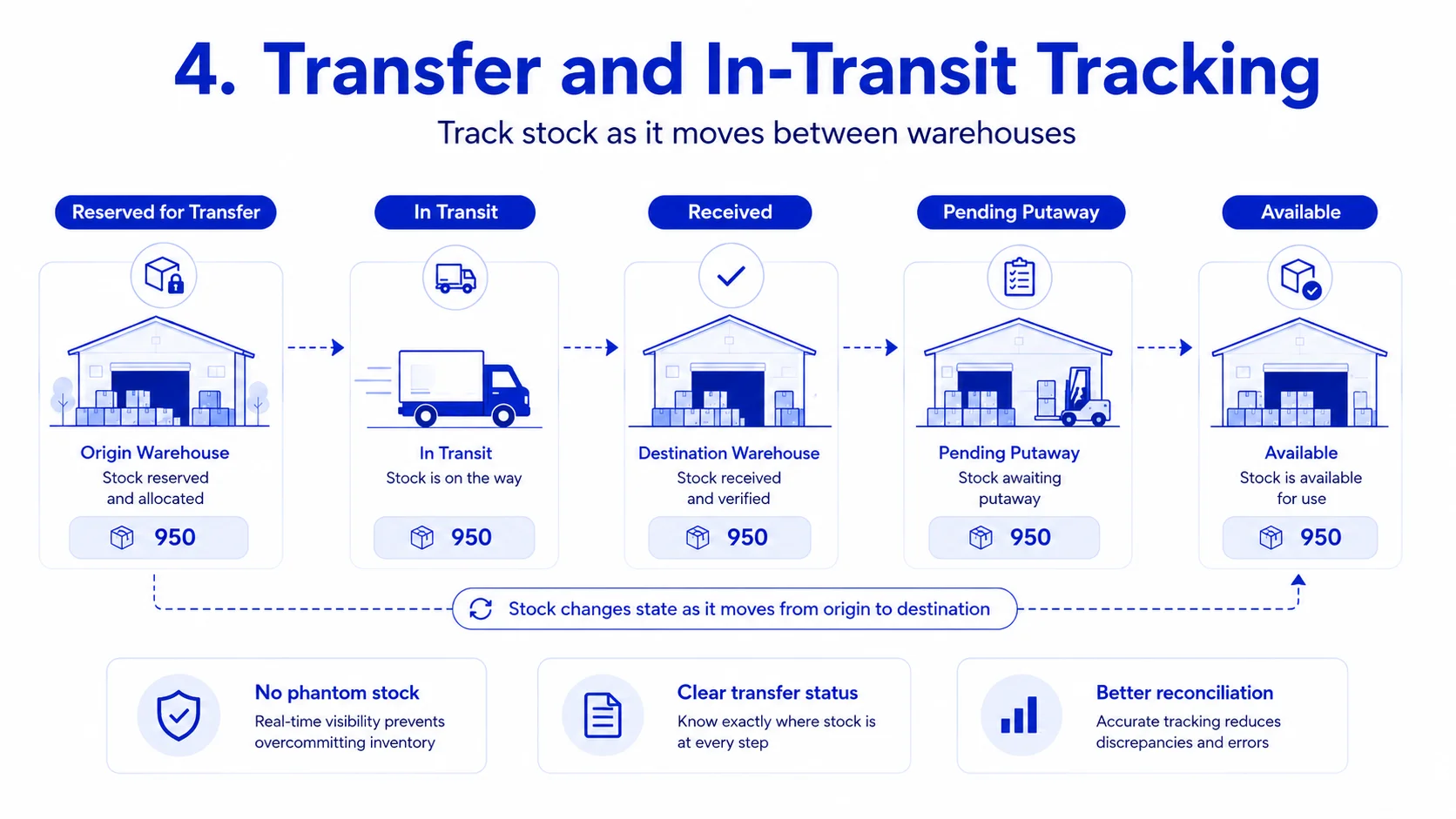
Transfers: A subtract-then-add, or a state machine?
Stock in motion needs its own lifecycle, moving from reserved for transfer to in transit to received and pending putaway to available. Skip this and you get phantom stock, inventory the system thinks exists but doesn’t, or vice versa.
Nyx Wolves designs transfer workflows with these states built into the system, so inventory movement does not disappear into a reconciliation gap.

Book a Free Architecture Call
Let Nyx Wolves help you design a smarter multi warehouse inventory system for real time visibility, allocation, and control.

How Nyx Wolves Helps Businesses Modernize Warehouse Operations
Step-by-step: building the system
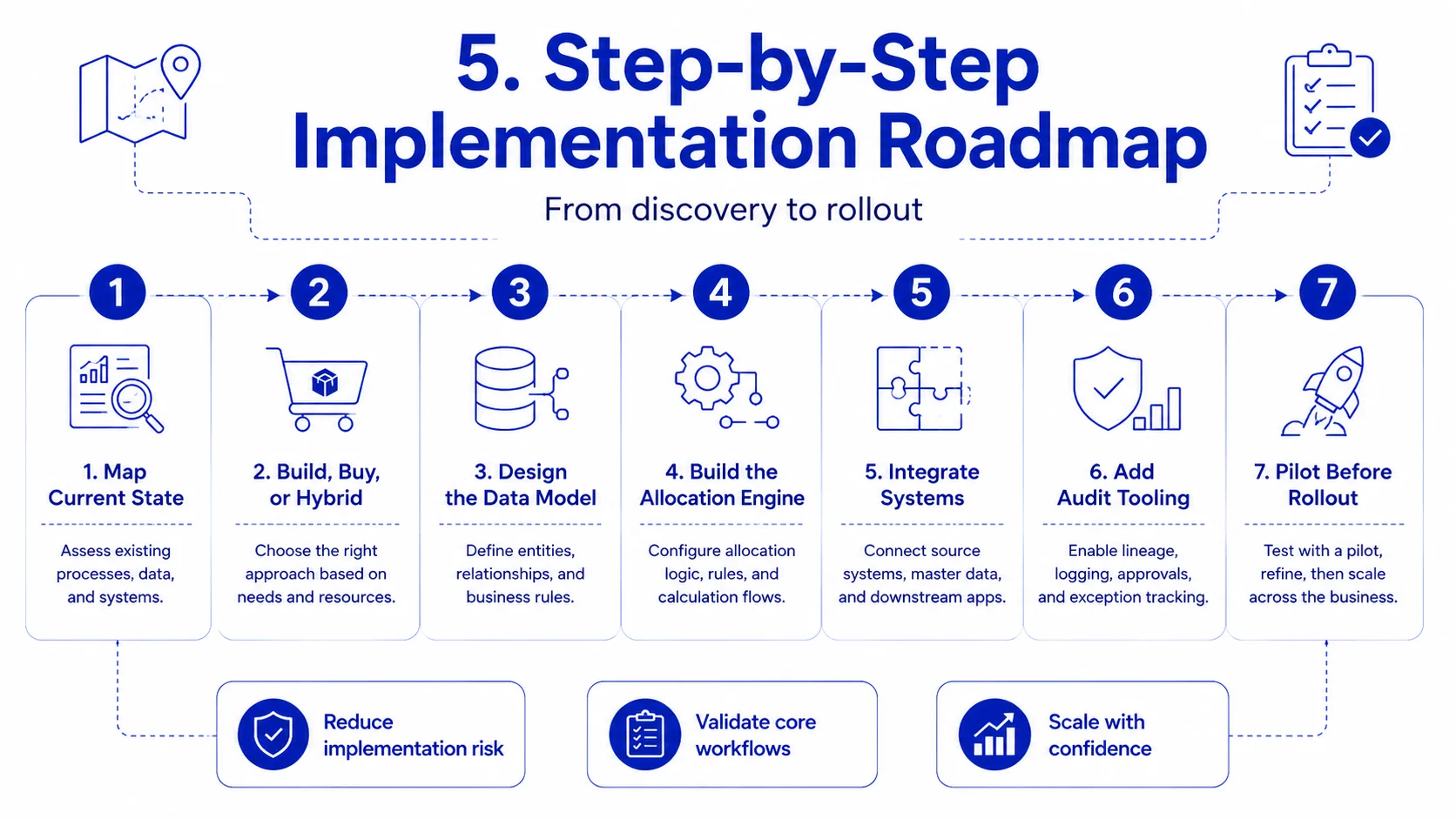
| Step | Focus | What it Involves |
|---|---|---|
| 1 | Map Current State | Understand before you architect. Document every warehouse, SKU category, transfer frequency, and pain point. This surfaces 60–70% of your requirements before any architecture decisions are made. |
| 2 | Build, Buy, or Hybrid | Pick the right path. Off-the-shelf works for under 5 warehouses with simple allocation logic. Custom rules or compliance needs call for a hybrid: a configurable core platform extended with custom logic. |
| 3 | Design the Data Model | Get the foundation right first. Nail three relationships before building any UI: SKU-to-warehouse stock levels, the transfer state machine, and order-to-fulfillment mapping. |
| 4 | Build the Allocation Engine | Where the real investment goes. Start with a rules-based engine weighing distance, stock, and cost. Add ML-driven demand prediction once you have 6–12 months of order history to train on. |
| 5 | Integrate with Existing Systems | Make it API-first. Build clean integrations with your OMS, shipping platforms, ERP, and storefronts. API-first architecture lets you add new sales channels without custom rework each time. |
| 6 | Build in Audit Tooling | Don’t treat it as phase two. Include cycle counts, discrepancy flagging, and reconciliation reports in the initial build, not as a later addition. |
| 7 | Pilot Before Full Rollout | Contain the blast radius. Test transfer logic, allocation, and sync reliability between one warehouse pair before rolling out network-wide, while a mistake still costs little to fix. |
OUR SUCCESS STORIES
AI & IT Success Stories

AI-Powered SCADA Optimization for the Largest Floating Desalination Plant
Improved operational efficiency by 40% and reduced downtime by 30% with AI-driven monitoring.
Sales and Policy Generating Chatbot
The solution was to develop a chatbot equipped with advanced NLP capabilities and risk assessment algorithms to streamline the process, making it more conversational and accessible for users.

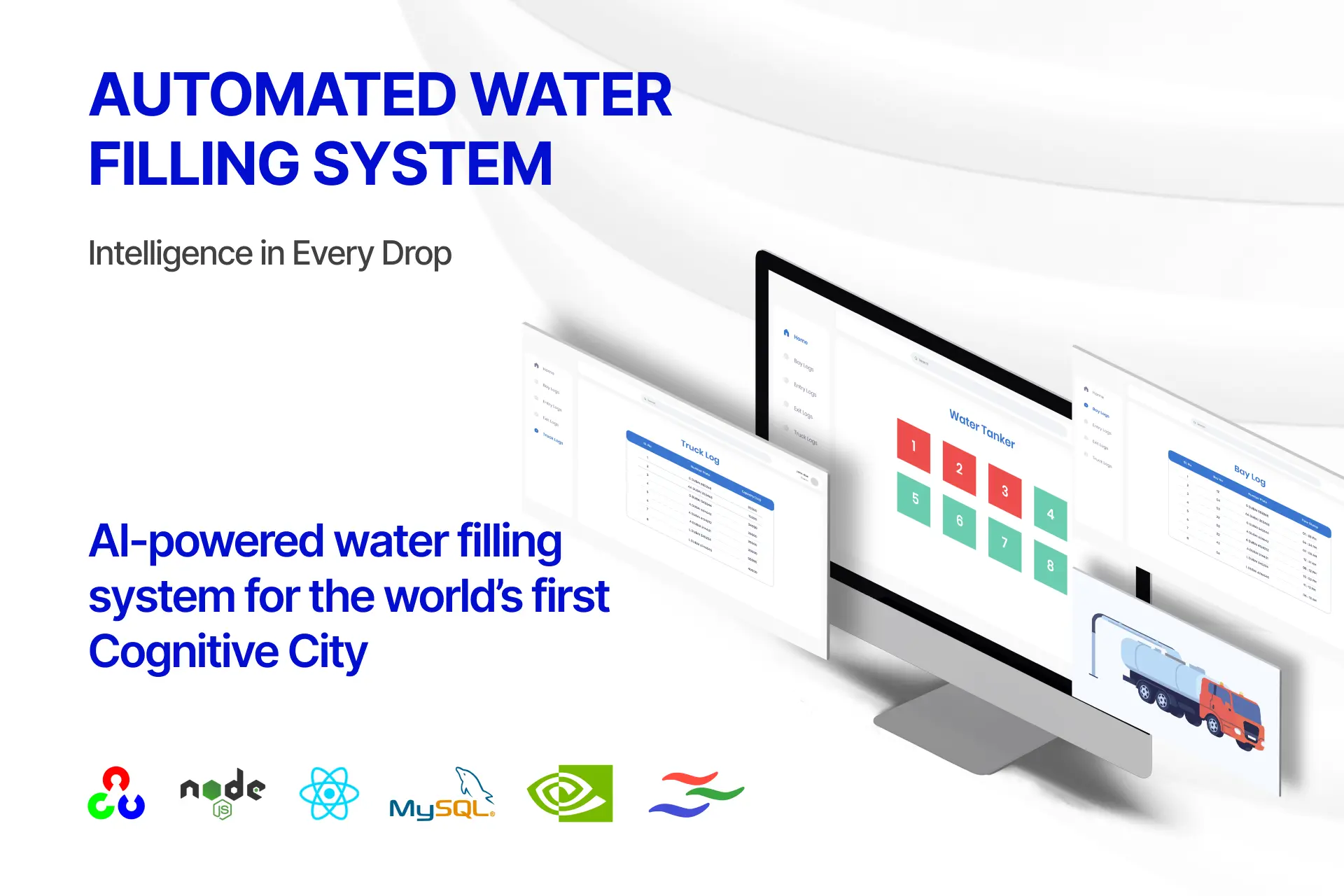
AI-driven automated water filling system
This initiative not only optimizes operational efficiency and safety but also demonstrates the transformative potential of cognitive technologies in urban infrastructure.
Mistakes We Help Businesses Avoid in Inventory System Development
Treating warehouse location as metadata instead of core architecture.
If location isn't built into the data model from the start, every subsequent feature becomes a workaround.
Underestimating the transfer and in-transit problem.
Companies frequently budget for inventory tracking but not for the more complex state management that transfers require, which leads to scope creep and budget overruns mid-project.
Choosing allocation logic that's too rigid.
Hard-coded rules like always shipping from the nearest warehouse look efficient on paper but fail the moment stock runs low at that location, leading to either order delays or expensive last-minute split shipments.
Skipping the pilot phase.
Full-network rollouts without a controlled pilot tend to surface critical bugs during peak demand periods, exactly when the cost of downtime is highest.
Ignoring warehouse staff workflow.
A technically elegant system that doesn't match how warehouse teams actually scan, pick, and pack inventory gets bypassed in practice, which leads to data drift between the system and physical reality.
What a Production Ready Inventory System Looks Like with Nyx Wolves
A multi-warehouse inventory system is production-ready when it can answer three questions accurately, in real time, under load:
- What do we have?
- Where is it?
- What’s the optimal way to fulfill this specific order right now?
Everything else like the dashboards, reporting, forecasting is valuable, but secondary to getting those three answers reliably correct at scale.
For operations that have outgrown spreadsheet-based or single-warehouse tools, the build effort is substantial but the payoff compounds quickly: fewer stockouts, lower split-shipment costs, faster fulfillment, and perhaps most valuable, the operational confidence to add new warehouses or sales channels without re-architecting from scratch each time.
If your team is evaluating whether to build this in-house, extend an existing platform, or bring in specialized engineering support to get the architecture right the first time, it’s worth scoping the data model and allocation logic carefully before committing to a path those two decisions drive nearly everything else in the system’s long-term reliability.
How Much Does It Cost to Build a Multi Warehouse Inventory Management System?
The cost of a multi warehouse inventory management system depends on the depth of the workflow, integrations, and automation required.
| System Level | Estimated Cost | What It Usually Includes |
|---|---|---|
| Basic Inventory System | $20,000 to $50,000 | Simple stock tracking, basic warehouse records, manual updates, simple reports. |
| Mid Level Multi Warehouse System | $50,000 to $150,000 | Multi-location stock visibility, transfers, barcode or QR workflows, user roles, and dashboards. |
| Advanced Multi Warehouse Platform | $150,000 to $400,000+ | Real-time sync, ERP or OMS integration, order allocation logic, audit trails, and reconciliation reports. |
| Enterprise Grade System | $400,000+ | AI forecasting, automated replenishment, high order volume support, compliance workflows, and multi-country operations. |
The biggest cost drivers are usually
- Real time stock synchronization
- Order allocation logic
- Inventory transfer tracking
- ERP, OMS, ecommerce, and shipping integrations
- Barcode or scanner workflows
- Audit logs and reconciliation reports
- Mobile app or handheld scanner support
- AI forecasting and replenishment
For most businesses, the smarter approach is to build the foundation first. Start with warehouse level stock visibility, transfer tracking, order allocation, core integrations, and audit reporting. Once that foundation is stable, advanced features like AI forecasting, automated replenishment, and workload balancing can be added later.
At Nyx Wolves, we help businesses scope the right architecture before they decide whether to build, buy, or customize their inventory system.
The real cost is not in the screens. It is in the logic behind stock accuracy, warehouse transfers, order reservations, and fulfillment decisions.
Ready to build an inventory system that scales across warehouses without stock errors?
FAQs
It depends on the complexity of the operation. Off the shelf software can work for simple warehouse networks with standard workflows. Businesses with custom allocation rules, complex integrations, compliance needs, or unique fulfillment logic may need a custom or hybrid inventory management system.
The cost depends on the number of warehouses, integrations, user roles, automation needs, reporting requirements, barcode workflows, transfer logic, and allocation complexity. A basic system costs less, while a custom multi warehouse platform with ERP integration, real time sync, and AI driven allocation requires a larger investment.
Yes. A well designed inventory management system can integrate with ERP, OMS, ecommerce platforms, shipping tools, barcode scanners, accounting systems, and warehouse management systems. API first architecture makes these integrations easier to maintain and scale.
The timeline depends on scope. A simple inventory system can be built faster, while a multi warehouse system with transfer workflows, real time sync, order allocation, ERP integration, and reporting dashboards needs a detailed discovery, architecture, development, testing, and rollout phase.
Nyx Wolves helps businesses design and build custom inventory management systems for multi warehouse operations. This includes inventory architecture, warehouse level stock models, real time synchronization, transfer tracking, order allocation engines, ERP and ecommerce integrations, barcode workflows, dashboards, and AI driven optimization.
A business should contact Nyx Wolves when its current inventory system cannot handle multiple warehouses, real time stock visibility, transfer tracking, ecommerce integration, or smart order allocation. Nyx Wolves can help scope the architecture, identify gaps, and build a scalable system that fits the operation.